Track Local Sports League Schedules: A Guide for Parents & Fans

The fastest way to stop missing local games is to find the league’s official schedule page and subscribe to its live calendar feed so changes auto-sync to your phone. Municipal parks and recreation portals and league-management systems such as TeamSideline and WebTrac are the authoritative source for real-time game times, locations, and rainout notices. Third-party aggregators are convenient, but they can lag behind last-minute changes published directly by league administrators.
Take these three steps now:
- Locate the official league page: check your municipal parks and recreation department website, school district athletics page, or YMCA recreation center site.
- Look for a calendar subscription link labeled “iCal,” “ICS,” “Subscribe,” or “Add to Google Calendar.”
- Tap or click that link to add the live feed to Google Calendar, Apple Calendar, or Outlook. Events will update automatically from that point forward.
- If you cannot find a subscription link, search the page for a “Schedule & Standings” or “Find Team Schedule” section.
- Save the league coordinator’s phone number and any listed rainout hotline while you are on that page.
Table of Contents
- Where do official league schedules actually live?
- How to view standings, rainouts, and live schedule changes
- How to set up an auto-updating calendar for league schedules
- Which apps and platforms help you follow local league schedules?
- How to track several leagues or teams without getting overloaded
- What to do when two sources disagree on a game time or location
- How local news supports schedule tracking and verification
- Key Takeaways
- The case for treating your calendar subscription as the real source of truth
- Thecentralgeorgian keeps Central Georgia fans informed
- Bookmark these authoritative scheduling resources
Where do official league schedules actually live?
The single most reliable place to find local league game times is the official portal managed by the organization running the league. Platforms like TeamSideline and WebTrac allow league administrators to publish game and practice schedules directly to municipal or association sites, with mobile access built in. That direct publishing chain is why these portals stay current when social posts and aggregators do not.
Primary sources to check first:
- Municipal parks and recreation department websites: Cities such as Fayetteville, N.C. and Round Rock, Texas maintain dedicated youth sports and athletic league pages with current schedules, standings, and field status.
- Official league portals: TeamSideline, WebTrac, SportsEngine, and LeagueApps each host schedule and standings modules that league administrators update directly.
- School district athletics pages: High school and middle school leagues typically post schedules through the district’s athletics department, often with separate pages per sport and season.
- YMCA and recreation center sites: Many local YMCAs and recreation centers manage their own league portals for adult and youth programs.
What to look for once you find the right page:
- A timestamped “last updated” notice on the schedule
- A “Schedule & Standings” or “Find Team Schedule” navigation link
- An iCal, ICS, or calendar subscription button
- A rainout or field-status hotline number
- Contact information for the league coordinator or parks and recreation office
Official portals beat third-party aggregators for one practical reason: updates are published by the people who control the schedule, highlighting the crucial role of real time event listings businesses in keeping information current. An aggregator pulls data on a delay and may not reflect a game moved two hours before kickoff.
Pro Tip: When you first land on a parks and rec schedule page, use your browser’s “Find” function (Ctrl+F or Cmd+F) and search for “iCal” or “subscribe.” Many portals bury the calendar link below the schedule table.
How to view standings, rainouts, and live schedule changes
Knowing a game is scheduled is only half the picture. Knowing whether it is still on when weather rolls in is the other half.

League-management platforms such as ManageYourLeague auto-publish Standings and Schedules modules directly to the league’s public website. That means the standings you see on the official portal reflect the current record, not a cached version from last week. Rainout notices follow the same path: administrators post field-status updates to the portal, and those changes appear immediately.
Follow these steps to confirm a game is on before you leave the house:
- Open the official league portal and check for a “Field Status” or “Rainout” page. Many parks and rec sites list this as a separate tab.
- Look for a “last updated” timestamp on the schedule. A timestamp from earlier that day is a reliable signal that the page is being actively maintained.
- Check whether the league offers push notifications or SMS alerts through its management platform. Mobile-friendly scheduling tools that include push or SMS alerts significantly reduce the need to call around to confirm game changes.
- If the portal has a rainout hotline number, save it as a contact in your phone now, before you need it.
Parks and recreation offices commonly list phone hours and contact numbers for schedule updates. When a field-status page is absent or outdated, a direct call to the parks and rec office remains the most reliable confirmation method available.
How to set up an auto-updating calendar for league schedules
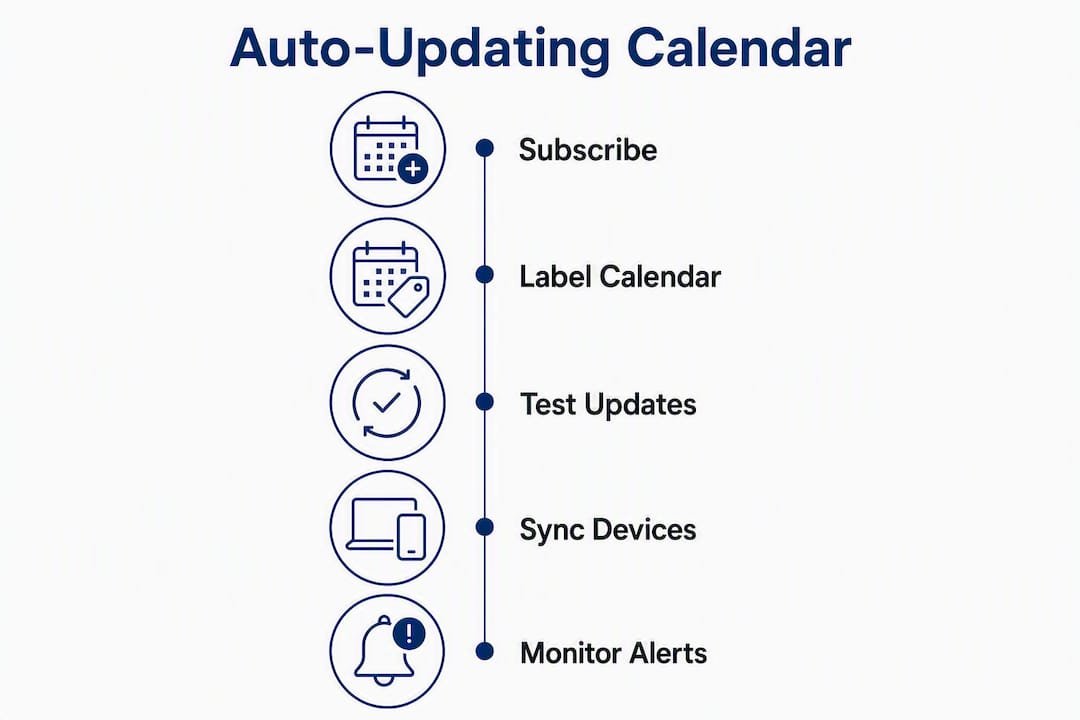
The single most effective change a parent or fan can make is replacing a static schedule download with a live calendar subscription. Downloading a one-off .ics file gives you a snapshot of the schedule at that moment. Subscribing to an iCal/ICS feed means your calendar updates automatically when the league reschedules a game, moves a location, or cancels due to rain, with no action required on your end.
Step-by-step setup:
- Go to the official league or parks and rec page and locate the iCal, ICS, or “Subscribe to Calendar” link.
- On a desktop, right-click the link and copy the URL. On mobile, tap the link directly.
- In Google Calendar: open Settings, select “Add calendar,” then “From URL,” and paste the feed URL.
- In Apple Calendar: go to File, select “New Calendar Subscription,” and paste the URL.
- In Outlook: go to “Add Calendar,” select “Subscribe from web,” and paste the URL.
- Confirm the calendar appears and assign it a distinct color so it does not blend with personal events.
- Set a reminder alert for each event at a practical interval before game-day travel.
After subscribing, test it. Watching for a scheduled change near a weather event is the best way to confirm auto-updates are working before you rely on the calendar for game-day decisions. Ask a league administrator to make a minor update, then check whether your calendar reflects it within a few minutes.
| Platform | Live iCal subscription | Google Calendar sync | Apple Calendar sync | Outlook sync | Push alerts |
|---|---|---|---|---|---|
| Google Calendar | Yes | Native | Via shared link | Via shared link | Yes (mobile app) |
| Apple Calendar | Yes | Via shared link | Native | Via shared link | Yes (iOS) |
| Outlook | Yes | Via shared link | Via shared link | Native | Yes (mobile app) |
| SportsCal | Yes | Yes | Yes | Yes | No (calendar only) |
| Calendar of Sports | Yes (CSV/ICS/PDF exports) | Yes | Yes | Yes | No |
Pro Tip: Label your subscribed league calendar “Spring Soccer 2026” or similar. A generic label like “Sports” becomes unreadable when you add a second or third league feed.
Which apps and platforms help you follow local league schedules?
The tools available fall into two categories: official league-management platforms that administrators control, and third-party aggregators that pull from multiple sources. Each serves a different purpose.

Official league-management platforms are where schedule authority lives. TeamSideline, WebTrac, SportsEngine, and LeagueApps each provide schedule and standings modules that administrators update directly. If your league runs on one of these systems, the platform’s own schedule page or app is the most current source available. If a team is not visible on an aggregator like TeamSideline, the most common cause is an incorrect roster email address. Contacting the coach to verify the registration email resolves this faster than filing a support ticket.
Third-party aggregators serve a different need. SportsCal generates auto-updating calendar subscription URLs that cover hundreds of teams and include watch links for streaming, with support for Google, Apple, and Outlook. Schedule Us and SportsAlways help users manage multiple leagues, convert game times to local time zones, and produce printable weekly agendas for offline use. ManageYourLeague also provides rainout tools and broadcast messaging for administrators, which is why schedules on sites using that platform tend to stay accurate.
The practical rule: use the official league portal as your primary source. Add an aggregator only when you need to combine several teams or leagues into a single calendar view. An aggregator that lags 30 minutes behind on a rainout notice is not a substitute for the official page.
| Feature | Official league platforms (TeamSideline, SportsEngine, etc.) | Aggregators (SportsCal, Schedule Us, SportsAlways) |
|---|---|---|
| Update frequency | Real-time (admin-controlled) | Delayed pull (varies by platform) |
| iCal/Google/Outlook sync | Yes (most platforms) | Yes |
| Push/SMS notifications | Yes (platform-dependent) | Limited |
| Multiple leagues in one view | No (one league per portal) | Yes |
| Mobile app available | Yes (SportsEngine, LeagueApps) | Varies |
| Rainout/cancellation alerts | Yes | Partial |
How to track several leagues or teams without getting overloaded
Parents following two children across different sports, or volunteers managing an adult recreational league alongside a youth program, face a specific problem: too many calendar layers, too many notifications, and duplicate events. The solution is consolidation before the season starts.
- Subscribe to each league’s iCal feed separately, then assign a distinct color to each calendar in Google, Apple, or Outlook. One color per team makes conflicts visible at a glance.
- Use an aggregator such as SportsAlways when you need a single subscription that combines multiple leagues. These platforms support a range of leagues and can output a single feed covering all of them.
- Disable notifications for any calendar you are not actively following that week. Notification fatigue causes people to ignore alerts entirely, which defeats the purpose.
- At the end of each season, archive or delete that calendar layer. Leaving finished-season feeds active creates clutter and can surface outdated events.
Pro Tip: Create one calendar named “This Season — Sports” and import only the teams you are actively following. When a season ends, export it as a backup and delete the live subscription. Start fresh next season with a clean feed.
Test for duplicate events after adding multiple feeds. If the same game appears twice, one feed is likely pulling from a source that mirrors another. Disable the lower-priority layer and keep the official league feed active.
What to do when two sources disagree on a game time or location
Conflicting information is common, particularly when a game is rescheduled within 24 hours of tip-off. The priority order below determines which source to trust.
Trust hierarchy:
- First: The official league portal or parks and rec page, checked for a current “last updated” timestamp.
- Second: Direct confirmation from the league coordinator or coach, using the contact information listed on the official page.
- Third: A timestamped official social post from the league’s verified account, posted within the past two hours.
- Fourth: An aggregator or third-party listing. Use this only when the above sources are unavailable.
Steps to resolve a conflict:
- Check the official portal for a revision timestamp. If it was updated within the past hour, that version is authoritative.
- Call or text the coach or league contact listed on the official page. This is faster than emailing support for any platform.
- If the portal and the coach disagree, ask the coach to confirm with the league administrator before you travel to the venue.
- Do not drive to the field based solely on an aggregator listing when the official page shows a different time or location.
For area-wide cancellations affecting multiple leagues simultaneously, such as a regional weather event closing all municipal fields, local news coverage provides consolidated confirmation. Thecentralgeorgian reports on community-wide closures and links to official parks and rec announcements, which is particularly useful when individual league pages have not yet been updated.
How local news supports schedule tracking and verification
Individual league portals are the right tool for team-level schedules. Local news serves a different function: consolidated alerts when conditions affect an entire region.
When a severe weather system closes all municipal fields across Central Georgia, or when a parks and rec department issues a facility closure affecting multiple leagues at once, a local outlet can confirm and aggregate that information faster than a parent checking six separate league portals. Thecentralgeorgian covers public safety alerts, weather-related closures, and community event updates that affect residents across the region. Following a local news outlet gives residents access to verified, timely updates that go beyond what any single league portal publishes.
Practical uses for local news in schedule tracking:
- Monitor Thecentralgeorgian for area-wide field closures driven by weather or public safety conditions.
- Use local reporting to find links to official parks and rec announcements when a league’s own page is slow to update.
- Check local coverage for context on postponements caused by facility issues, permit changes, or local sports funding decisions that affect multiple leagues.
The most reliable workflow combines both: bookmark the official league portal for team-level game times, and follow Thecentralgeorgian for region-wide alerts. Neither source alone covers every scenario.
Pro Tip: Set a Google Alert for “[your city] parks and recreation” to receive email notifications when the municipal parks page publishes new content, including field closures and schedule revisions.
Key Takeaways
The most reliable way to track local sports league schedules is to subscribe to the official iCal feed from the league’s own portal, then use local news for area-wide closures that affect multiple leagues at once.
| Point | Details |
|---|---|
| Official portals are the source of truth | Municipal parks and rec pages and league platforms (TeamSideline, WebTrac, SportsEngine) publish real-time updates directly from administrators. |
| Subscribe, do not download | An iCal/ICS subscription auto-updates for rainouts and reschedules; a static .ics download does not. |
| Resolve conflicts by priority | Check the official portal first, then contact the coach or league coordinator, then check timestamped social posts. |
| Consolidate multiple leagues | Use color-coded calendars and aggregators like SportsAlways to combine several teams into one readable view. |
| Thecentralgeorgian for area-wide alerts | Follow Thecentralgeorgian for confirmed regional closures and links to official parks and rec announcements affecting multiple leagues. |
The case for treating your calendar subscription as the real source of truth
Most missed games trace back to one decision: trusting a screenshot of a schedule instead of subscribing to the live feed. A screenshot is accurate the moment it is taken. A subscribed calendar feed is accurate every time you open it.
The conventional advice to “check the league website before every game” is reasonable, but it places the burden on the parent to remember, to navigate to the right page, and to notice whether anything changed since the last visit. A live calendar subscription reverses that burden. The schedule comes to you. A rainout notice appears on your phone the same way a meeting cancellation does.
The tools covered here, from TeamSideline and SportsEngine on the official side to SportsCal and SportsAlways on the aggregator side, all point toward the same conclusion: the technology for reliable schedule tracking already exists and is free to use. The gap is not the tools. The gap is that most parents and fans have not yet made the one-time setup investment to connect the official feed to their calendar.
Do that once, test it once, and the problem of missing or arriving at the wrong time largely disappears.
Thecentralgeorgian keeps Central Georgia fans informed
When weather shuts down fields across Central Georgia or a parks and rec department issues a multi-league suspension, Thecentralgeorgian publishes consolidated alerts so residents do not have to check a dozen separate portals. The coverage includes links to official announcements, field-status updates, and community sports news for the region.
Readers who follow Thecentralgeorgian receive timely reporting on area-wide closures, curated weekend sports coverage, and direct links to official league and parks and rec pages. For weather-driven cancellations in particular, the guide to monitoring local weather emergency updates is a practical companion to any league calendar subscription. Visit Thecentralgeorgian and bookmark the site for Central Georgia sports alerts, community event coverage, and the verified local reporting that keeps residents informed before game day.
Bookmark these authoritative scheduling resources
The links below are organized by type. Open the one that matches your immediate need.
Official municipal and league portals:
- City of Fayetteville, N.C. — Youth Sports: example of a well-structured municipal parks and rec athletics page with schedules and contacts.
- City of Round Rock — Athletic Leagues: adult and youth league schedules with registration and standings links.
- CRPR Sports & Leagues — Centre Region Parks & Recreation: regional parks and rec portal with sport-specific schedule pages.
- iFoothills Sports & Leagues: community recreation leagues with schedule and standings modules.
League-management platforms (find your league’s portal here):
- TeamSideline — Find Team Schedule: search by organization or team name; supports iCal subscriptions and mobile access.
- ManageYourLeague — Schedule Maker: administrator tool with auto-published standings, rainout tools, and broadcast messaging; live feeds available.
Calendar and aggregator tools:
- SportsCal: auto-updating iCal subscription URLs for hundreds of teams; supports Google, Apple, and Outlook with watch links included.
- Calendar of Sports: personalized ICS feeds with CSV, ICS, and PDF export options for offline or printable use.
- SportsAlways: multi-league aggregator with local time zone conversion and printable weekly agendas.
| Resource | Type | Best for |
|---|---|---|
| TeamSideline | Official league platform | Finding your team’s live schedule and iCal link |
| ManageYourLeague | Admin/league platform | Standings, rainout notices, broadcast alerts |
| SportsCal | Aggregator | Auto-updating calendar with watch links |
| Calendar of Sports | Aggregator | Printable/CSV exports for offline use |
| SportsAlways | Aggregator | Combining multiple leagues into one view |
| Municipal parks and rec pages | Official government portal | Field status, rainout hotlines, coordinator contacts |
Pro Tip: Bookmark the “Find Team Schedule” page on TeamSideline and your local parks and rec athletics page as your two default starting points. If your league uses a different platform, the parks and rec page will usually link to it directly.